


Allervibe
Download for free

Allervibe: Food Allergy Scanner App

Easily identify allergens in products

  • Works by scanning the barcode of the product
  • Detects 13 different allergens
  • Lists allergens, traces, additives & preservatives
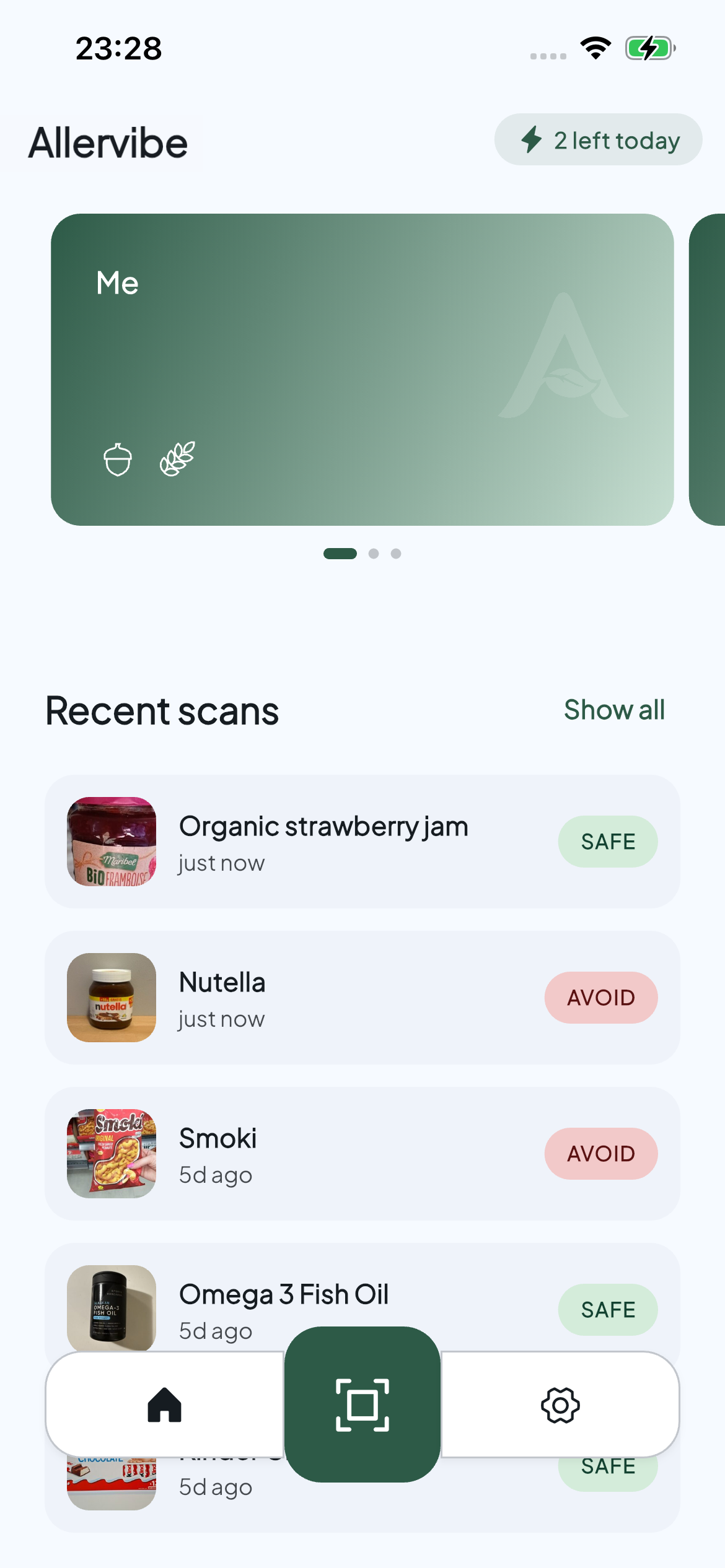
Allervibe app home screen

How it works

Scan. Decide. Eat.

Point your camera at any barcode. Allervibe reads the ingredients, matches them against your profile, and gives you a result: safe ✅, caution ⚠️, or avoid ❗.

Best food allergy scanner app

Allervibe is built for one job: tell you, in a few seconds, whether a packaged product is likely to contain an allergen you avoid. Open the app, point your camera at the barcode, and you get one of three answers, safe, caution, or avoid, based on the ingredient list pulled from Open Food Facts. No ads, no upsell in the middle of a result, no account required to start scanning.

It is most useful at the supermarket: comparing two pasta sauces, double-checking a snack you have not bought before, or shopping in a country where you do not read the language. Pair it with your own label-reading habits and you spend less time squinting at fine print and more time actually buying food.

How to read food labels with allergies

An app is a shortcut, not a replacement. The packaging in your hand is the source of truth, manufacturers update recipes, run shared production lines, and change suppliers more often than open databases can keep up. Treat Allervibe (or any scanner) as a quick first pass, then confirm on the label itself before you eat.

A few habits that help: read the bold allergen statements first (in the EU and UK they are highlighted directly in the ingredient list); check the "may contain traces of" line right below; and watch out for ingredient names that hide common allergens (whey and casein for milk, semolina and spelt for wheat, lecithin for soy). When in doubt, put it back on the shelf.

Barcode scanner for food intolerances

Allergies and intolerances overlap on the label even when they feel different in the body. Allervibe covers the most common triggers: lactose and milk proteins, gluten and wheat, peanuts and tree nuts, soy, egg, sesame, mustard, celery, fish and shellfish, and sulphites. Pick the ones that apply to you in your profile, and every scan filters against that list.

If you live with lactose intolerance, celiac disease, or a sensitivity that means reading every label, a barcode scanner cuts the time per product from a minute to a few seconds. You still verify the ones that matter, but you stop verifying the ones that are obviously fine.

Ready to eat without guessing?

Download Allervibe and find out in seconds whether a product contains your allergens.

Frequently Asked Questions

What is Allervibe?
Allervibe is a mobile app that helps you check whether a packaged product contains an allergen you avoid. Just scan the barcode and the app reads the ingredients for you.
How does Allervibe work?
You set up a profile with the allergens you avoid. Point your camera at a barcode. Allervibe pulls the ingredient list from Open Food Facts and matches it against your profile. You get one of three verdicts: safe (green), caution (yellow), or avoid (red).
What allergens does Allervibe detect?
Thirteen presets covering the most common food allergens: peanuts, tree nuts, milk, eggs, soy, wheat, gluten, sesame, shellfish, fish, sulphites, mustard, and celery.
Is Allervibe free?
Yes. The free tier covers daily scans and a single profile. The optional Pro upgrade unlocks unlimited scans, full scan history, favorites, multiple profiles, and an additives breakdown.
Is Allervibe available on the App Store and Google Play?
Yes, Allervibe is published on both the Apple App Store and Google Play.
Is Allervibe accurate?
Allervibe is only as accurate as the underlying Open Food Facts data, which is community-edited and may be incomplete or wrong. Always read the product packaging before you eat. Treat the app as a hint, not a final word.
Can I use Allervibe if my allergies are life-threatening?
Allervibe is an informational tool, not a medical device. If you have a severe allergy, do not rely on the app alone, read the packaging, follow your doctor's guidance, and carry your prescribed medication.
How do I cancel my subscription?
Subscriptions are billed by Apple or Google. Cancel any time from your store account: App Store → Settings → your name → Subscriptions, or Google Play → Account → Payments & Subscriptions. Cancellation takes effect at the end of the current period.